Sunday, February 6, 2011

Laptop Cpu Cooling Fan Not Working.....?


Yes, the fan, if plugged into the headers on the Motherboard, should be spinning. Even PWM controlled fans spin unless you manually disable them.

What kind of Laptop do you have? Usually, there's more than 1 fan header in Desktop Motherboard and You can always plug in the fan into a different fan header on the Motherboard to test the fan. but on Laptop motherboard there is only one header socket.
The one that is labeled CPU fan is to monitor and control it through the bios. If you fan isn't spinning when you boot up your Laptop, go into the bios, manually override the fan setting to spin at 100% all the time. If it doesn't spin, then there's a problem. Either your fan or the fan controller PWM circuit on the motherboard.

basically CPU fan has three to four pin connector/jack and different color wire.
fan connector placement is shown in the figures below:

Pin #Signal FunctionWire Color
1CPU Fan PWMGreen
2CPU Fan InYellow
3CPU Fan PowerRed
4GroundBlack

Pin Name Color
1 GND black
2 +5VDC yellow
3 Sense green
4 Control blue
CPU fans may use it 3-pin or 4-pin power connectors. 3-pin connectors are usually used for the smaller fans with lower power consumption and 4-pin connectors are usually used by CPU fans with higher power consumption. Fans and on-board fan headers are backwards compatible.
if now your fan not spinning even if it is proper plugged in on laptop motherboard, and your bios is fine
then first of all you should have to check fan with a 5v battery or you can use little high voltage battery like 9v but at this time don't connect fan with battery for a long time, that can damage fan.
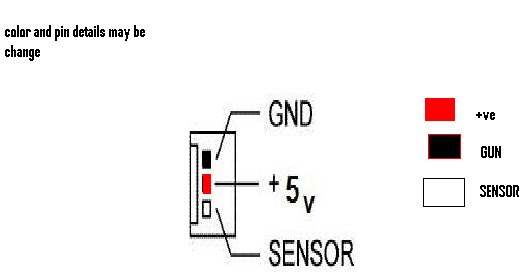
to check a CPU fan with a battery just leave sensor pin free(no connected) and connect it's positive terminal with battery +ve point and GUN pin of fan connect with -ve of battery shown in the figures below if Fan start spinning that means CPU fan is ok now the problem has in your laptops motherboard


checking Laptop CPU Cooling Fan using a external battery


Saturday, January 8, 2011

CHARGING PROBLEM IN LAPTOP.

There is a lot of problem facing by user and a chip level technical .one of them is laptop shuts down every time charger plugged in. Charging only works if connected before turning on laptop even A/C adopter is OK.
This problem happens because of laptop charging circuit failure and it is not
an easy job to diagnose problem on laptop motherboard.
This problem happened because of switching Mosfet or Op amp IC failure.
But remember before you take any chip-level action please check laptop with another good adapter.
Now i m going to show you how you can fix this problem on hp dv3000 series,it is very simple way just replace component for 100% solution if you didn't fix after resold following pitcher.

have a good luck friends

Wednesday, December 22, 2010

fix Nvidia problem.


most common problem with all laptops which are having BGA NVIDIA graphics chip,
given below
..


1) bad display/black

2) running vertical/horizontal lines of whole lcd display

3) restarting/hanging

5) no display(blank)

6) external monitor projector display okay but laptop lcd not showing display

7) laptop lcd showing display but no external output.


Let see how to fix nvidia problem in HP DV2000 laptop...


(laptop display was coming like this before my chip level operation.)


the very first think about my this post on RE-FLOW BGA CHIP is, you don't need a costly BGA REWORK STATION MACHINE to fix the problem all time .
that can be possible to fix without special machine
just you need a simple smd hot air gun(smd rework station) or a heat blower.

so....let see how you can re-flow the BGA chip without having a special

first open laptop carefully and take it'a motherboard on your working desk,
and start flow my steps

normally warm-up motherboard slowly


Start focusing heat blower on NVIDiA BGA chip

you can choose a good quality liquid flux as per your requirement


Reinstall CPU and heat-sink


Now your laptop motherboard ready to working again.
so check it out.....


that all step i flowed to fix a hp DV 2000 nvidia BGA problem, without using a costly BGA rework station :))

have a gooood luck!!! frds

Friday, December 10, 2010

Entering Bloging


I am not pro , but i know decent about computer chip level repairing. As, I survive in this industry, every day i repair many computer and laptops at my workplace.

Some time i face some problem which are not common/easy ones , when i repaired some problems like these I want like to remember the fix , for next time but i can't remember them all. I feel blogging is a good way to brush up my memory and to learn from another masters out there reading and commenting .

Basically i blog for laptop repairing solutions .
I will try to present all laptop repairing solution in easy way.