Wednesday, August 31, 2011

How to fix keys on laptop keypad not working even keypad already replaced.

If you replaced the keyboard and the same exact keys are still not working then you most likely have a system board issue.
But check basic things and make sure before turning to any chip level operation that did you insert the cable properly and is your zip connector or header of keypad is good or broken from anywhere?

Some of my known people who connected with the laptop computer hardware repairing filed but they don't done any chip level work on laptop so they use to send me the faulty laptop for repair in which they feel a chip level issue they do only diagnose and fix only software and common hardware level problem like installation of software, OS and part replacing work replace hard drive, ODD, LCD, Keypad, Touch-pad, Hinge and main board but replacing main board is too much costly.
Some time problem can't get fix after just replacing the part that they think is a faulty spare because they do repair on the basic diagnostic way if keypad not working ( problem can be some keys not working or functioning properly, keypad died not detected at all ) after checked some basic thing like OS issue driver and finally replaces the keypad as usual we all have to do.
But if problem couldn't get fix then its means problem is not a normal issue that will need a chip level operation so as usual they forward me this case. When they come to me most likely they said ''I have replaced the keyboard on this laptop 2, 3, 5 times but sill keypad not working.” These same letters stop working after a while. Replacing the keyboard worked before'' also most of the time same thing happened with mouse touch-pad.
Before I going to tell how can easily repairer this kind of case..I just want to remained you a basic block diagram of laptop motherboard.


As this diagram keypad and touch pad PS/2 controls are controlled by EC chip and if EC chip not present than I/O chip controls the PS/2 control.


Every laptop notebook manufacture uses a different type keypad model and their header for their different laptops models. And there header size and their pin datasheet may not be same. so before wasting your time to get datasheet and any other solution to fix the problem to searching on Google just re-soled the I/O chip and pull up resistor pack capacitor pack or simple SMD resistor which have connected with keypad connector and direct with I/O chip because today laptop manufactures use the I/O chip which have in built EC controller.
You can use hot air blower or a micro iron for re-soldering process… mostly pull up resistor and capacitors has solder nearby the keypad connector or header.

Pay little care if you have not familiar with SMD components.
If after re-soldering can fix you problem then you must have to change the EC or I/O chip :(
have a good luck :)

Thursday, August 4, 2011

Power up a laptop motherboard without power button or power strip.


Yes we can power up a laptop without connecting it's power button board or power strip..!! same as a desktop mother board.
It's safe as well as desktop motherboard just you need to know how power system of motherboard is functioning or how it's work as we press power button.
Switching the power 'on & off' is done by circuits on the motherboard.The circuits are triggered to change state by a momentary shot circuit of two points in the circuit. That is done by the push power button. A short-term connection of that button is enough to turn on motherboard. Usually one pin of on/off switch is shant with (ground) GUN. and second pin of on off switch connected with the circuit and always there is stay a (very low power +voltage) high pulse on the track of the power switch as we press the on off switch switch shot the high plus with Ground. and due to ground, plus trun down to low '0' and circuit turn on the motherboard.
Power on and off system controlled by super I/O chip on motherboard of laptop or some time some motherboard manufacture use some component (IC,Mosfet, Transistor) interface between power button and in I/O (input output controller) chip and mostly power switch being connected direct with I/O.

Is it a safe and easy method to on and off motherboard without connecting POWER button PCB or strip while repairing? :-

It is a good and easy way. If you repairing a major fault of laptop motherboard and while repairing there is need to power up motherboard many time and i think you already know what can be happen if we connect and disconnect a ribbon flex cable many times from connectors, connecting tips of the ribbon flex cable may be get tempted and brake! and it is very hard job to recondition a tempted or broken ribbon cable, even it's also a hard and time consuming job if you looking for a same new one cable in your local market.
So that is a very most common problem with flex cables.

How to find a ON and Off button logic track (PS ON signal) on laptop motherboard :-
It,s very easy to find out form where we can turn on a laptop without connecting it,s on/off switch PCB.
set the multimeter on continuity or buzzer range And simply trace the power switch non ground track from switch to it's ribbon flex cable or connector.

follow this video....


CHECK IN THIS VIDEO DEMO HOW TO POWER UP A ACER ASPIRE 5920 LAPTOP WITHOUT USING THE POWER button board or POWER STRIP :-


And in some of laptop main board you will found a already not connected tips for power on off function, So I putt here a image of this kind of laptop motherboard it's image:-

ON board power on,off tip of:- Compaq Presario V6000,Compaq F700,HP Pavilion DV6000 series,HP Pavilion DV9000 Motherboard,hp pavilion dv7.


But mostly we have to find the PS ON track on main board with the help of continuity meter. :P

HAVE A GOOD LUCK :)

Thursday, March 10, 2011

HOW TO REPAIR LAPTOP CPU FAN CIRCUIT

If you have a working fan and it is properly connected with laptop motherboard and by bad luck it's not spinning as usual.
First of all try to update laptop BIOS and if still nothing fixed then come down to CHIP LEVEL treatment of laptop. Now only two thing you can do to make laptop again working.

1.Check +voltage and senser track from fan connector, find out the CPU fan PWM controller circuit, cpu fan supply comes from output section of fan PWM circuit and this circuit not a smmiliar kind for all laptops and notebooks basically +5 voltage required on Vcc pin to spinning fan and to find out Vcc pin of CPU fan read my previous post no CPU COOLING FAN NOT WORKING
check cpu fan controller circuit and it's all fusible resistor or small coil in circuit with a simple OME meter or continuity meter coil and fuse should be show zero continuity on there surface and if no continuity , found open component then you can bypass them using a unshielded Cooper wire.sure it will work again if other things are OK
and unfortunately no any coil and fuse you found on fan controller section then just resold this section using hot air-gun and check other components of fan PWM circuit if possible at your own way :)

2.now you try all you best and still have same problem then now a good news for you because we can power up laptop notebook cpu fan Directly without using PWM controller circuit..
just found out the +5v track on motherboard nearby fan supply track ,connect the fan Vcc pin with +5v track using shielded thin wire jumper on motherboard and some time you can make your fan alive as just remove only the sence pin of fan from it's connector if + five volt is already coming on the power pin of fan.
..now your fan will start working but it will start spinning in a same speed non stop till the laptop is on. but doing this thing please confirm that which supply given to fan directly by jumper that will be generated after you turned on laptop.
have a good luck :)

Sunday, February 6, 2011

Laptop Cpu Cooling Fan Not Working.....?


Yes, the fan, if plugged into the headers on the Motherboard, should be spinning. Even PWM controlled fans spin unless you manually disable them.

What kind of Laptop do you have? Usually, there's more than 1 fan header in Desktop Motherboard and You can always plug in the fan into a different fan header on the Motherboard to test the fan. but on Laptop motherboard there is only one header socket.
The one that is labeled CPU fan is to monitor and control it through the bios. If you fan isn't spinning when you boot up your Laptop, go into the bios, manually override the fan setting to spin at 100% all the time. If it doesn't spin, then there's a problem. Either your fan or the fan controller PWM circuit on the motherboard.

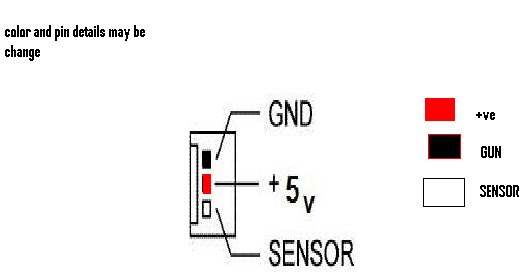
basically CPU fan has three to four pin connector/jack and different color wire.
fan connector placement is shown in the figures below:

Pin #Signal FunctionWire Color
1CPU Fan PWMGreen
2CPU Fan InYellow
3CPU Fan PowerRed
4GroundBlack

Pin Name Color
1 GND black
2 +5VDC yellow
3 Sense green
4 Control blue
CPU fans may use it 3-pin or 4-pin power connectors. 3-pin connectors are usually used for the smaller fans with lower power consumption and 4-pin connectors are usually used by CPU fans with higher power consumption. Fans and on-board fan headers are backwards compatible.
if now your fan not spinning even if it is proper plugged in on laptop motherboard, and your bios is fine
then first of all you should have to check fan with a 5v battery or you can use little high voltage battery like 9v but at this time don't connect fan with battery for a long time, that can damage fan.
to check a CPU fan with a battery just leave sensor pin free(no connected) and connect it's positive terminal with battery +ve point and GUN pin of fan connect with -ve of battery shown in the figures below if Fan start spinning that means CPU fan is ok now the problem has in your laptops motherboard


checking Laptop CPU Cooling Fan using a external battery


Saturday, January 8, 2011

CHARGING PROBLEM IN LAPTOP.

There is a lot of problem facing by user and a chip level technical .one of them is laptop shuts down every time charger plugged in. Charging only works if connected before turning on laptop even A/C adopter is OK.
This problem happens because of laptop charging circuit failure and it is not
an easy job to diagnose problem on laptop motherboard.
This problem happened because of switching Mosfet or Op amp IC failure.
But remember before you take any chip-level action please check laptop with another good adapter.
Now i m going to show you how you can fix this problem on hp dv3000 series,it is very simple way just replace component for 100% solution if you didn't fix after resold following pitcher.

have a good luck friends

Wednesday, December 22, 2010

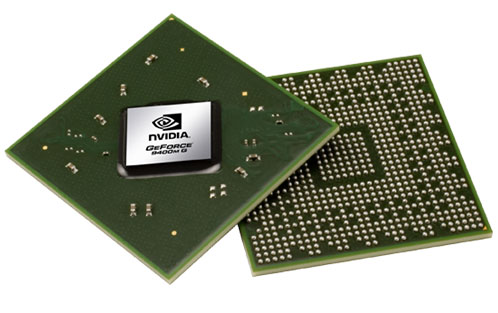
fix Nvidia problem.


most common problem with all laptops which are having BGA NVIDIA graphics chip,
given below
..


1) bad display/black

2) running vertical/horizontal lines of whole lcd display

3) restarting/hanging

5) no display(blank)

6) external monitor projector display okay but laptop lcd not showing display

7) laptop lcd showing display but no external output.


Let see how to fix nvidia problem in HP DV2000 laptop...


(laptop display was coming like this before my chip level operation.)


the very first think about my this post on RE-FLOW BGA CHIP is, you don't need a costly BGA REWORK STATION MACHINE to fix the problem all time .
that can be possible to fix without special machine
just you need a simple smd hot air gun(smd rework station) or a heat blower.

so....let see how you can re-flow the BGA chip without having a special

first open laptop carefully and take it'a motherboard on your working desk,
and start flow my steps

normally warm-up motherboard slowly


Start focusing heat blower on NVIDiA BGA chip

you can choose a good quality liquid flux as per your requirement


Reinstall CPU and heat-sink


Now your laptop motherboard ready to working again.
so check it out.....


that all step i flowed to fix a hp DV 2000 nvidia BGA problem, without using a costly BGA rework station :))

have a gooood luck!!! frds

Friday, December 10, 2010

Entering Bloging


I am not pro , but i know decent about computer chip level repairing. As, I survive in this industry, every day i repair many computer and laptops at my workplace.

Some time i face some problem which are not common/easy ones , when i repaired some problems like these I want like to remember the fix , for next time but i can't remember them all. I feel blogging is a good way to brush up my memory and to learn from another masters out there reading and commenting .

Basically i blog for laptop repairing solutions .
I will try to present all laptop repairing solution in easy way.